
Using Git#
Overview#
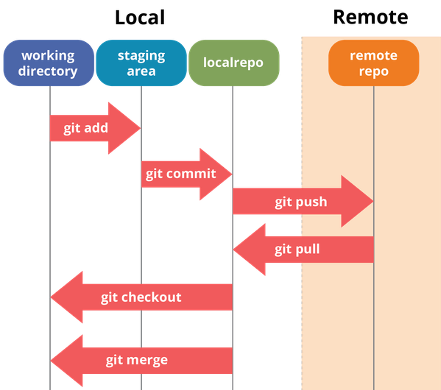
Image taken from: Git & GitHub Workflow Fundamentals
Set up Git on KLC#
Set the username and email it will use when it records your commits (done once; unrelated to GitHub login)
git config --global user.name "John Doe"
git config --global user.email johndoe@northwestern.edu
git config --list
Common git Commands#
# Initialize tracking of a new directory
cd work_directory
git init

# Download Github repo to your current directory
git clone github_repo_html_link

# Check current status
git status
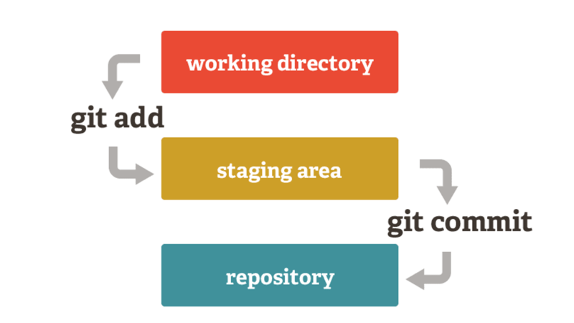
Image taken from: Changing a Super Old Git Commit History
# Add new file for git tracking
git add filename

# Adds all changes to existing files to the Staging Area
git add -u

# Commit changes to repo
git commit -m "message"

# Check log of commit
git log

# Retrieve a previous version of a commit
git checkout commit-hash-string
Working with Remote Repositories#
# Clone an existing GitHub repo to your current directory
git clone https://github.com/your-username/your-repo.git

# Push local commits to remote
git push

# Pull latest changes from remote
git pull
Branching#
# List all branches
git branch

# Create and switch to a new branch
git checkout -b my-branch

# Switch to an existing branch
git checkout main

# Merge a branch into the current branch
# First switch to the branch you want to merge INTO (usually main),
# then run git merge with the branch you want to bring in.
# Example: merge my-branch into main
git checkout main
git merge my-branch
# Git will try to merge automatically. If there are conflicts,
# it will mark the affected files — edit them to resolve, then:
git add resolved-filename
git commit

# Delete a branch after merging
git branch -d my-branch
Ignoring Files with .gitignore#
Create a .gitignore file in the root of your repo to exclude files from tracking. This is especially important on KLC to avoid accidentally committing large data files or credentials:
# Example .gitignore
*.csv
*.parquet
*.h5
.env
__pycache__/
Resources#
Advanced topics: Intermediate Git Workshop (NUIT)